
Mailing Statistics & Geo Report
Mailing Statistics & Geo Report
Every mailing you send tracks opens, clicks, and geographic data.
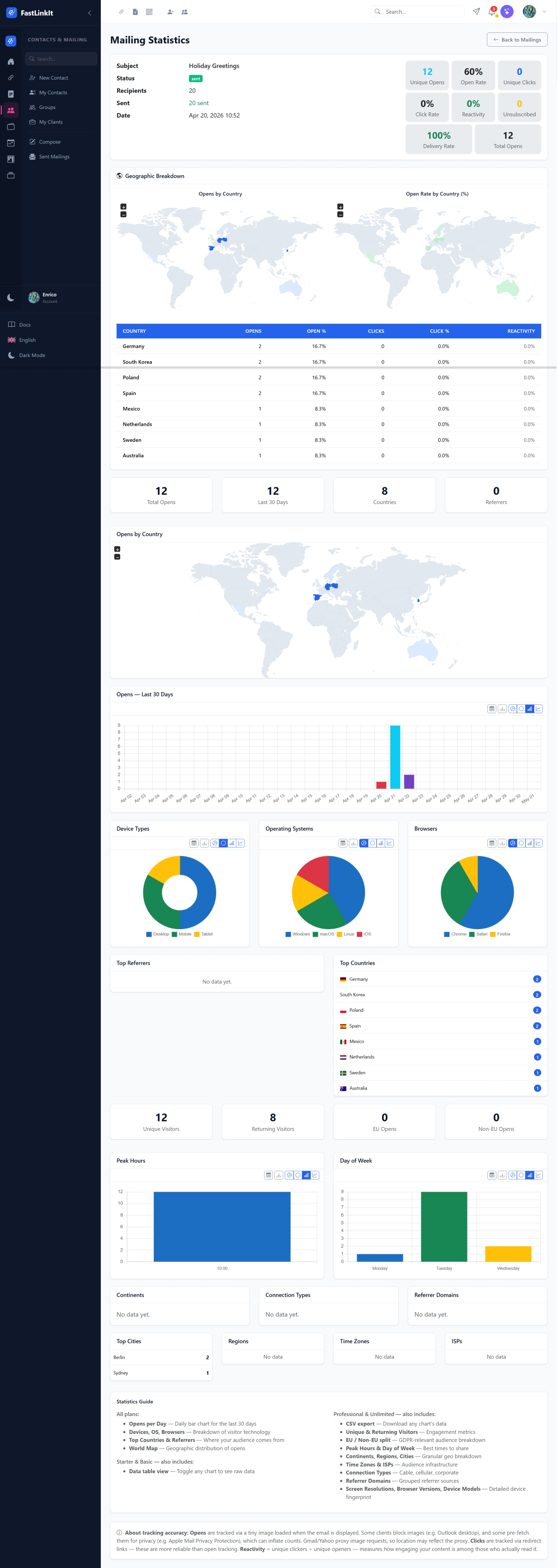
Key Metrics
| Metric | Description |
|---|---|
| Unique Opens | Recipients who opened at least once |
| Open Rate | Unique opens / sent (%) |
| Unique Clicks | Recipients who clicked at least one link |
| Click Rate | Unique clickers / sent (%) |
| Reactivity | Unique clickers / unique openers (%) — measures engagement among readers |
| Delivery Rate | Sent / total recipients (%) |
Geographic Breakdown
The geo report shows two side-by-side maps:
- Opens by Country — blue choropleth showing open count per country
- Open Rate by Country (%) — green choropleth showing relative open rate
Below the maps, a detailed table shows per-country statistics:
- Country name, opens count, open %, clicks count, click %, and reactivity
Click Tracking
All links in mailing emails are automatically wrapped with tracking redirects. When a recipient clicks a link:
- The click is recorded (timestamp, recipient)
- The recipient's
ClickCountis incremented - The mailing's aggregate
ClickCountis updated - The recipient is redirected to the original URL
Unsubscribe links and tracking pixels are not wrapped.
Open Tracking
Opens are tracked via a 1×1 transparent GIF pixel embedded before the closing </body> tag. On first open, the system captures:
- IP address → GeoIP lookup (country, city)
- User-Agent → device type, OS, browser/mail client
- Timestamp
Note: Some email clients block images (Outlook desktop) or pre-fetch them (Apple Mail Privacy Protection), which can affect accuracy.